

Tracking Analysis
This step uses the Well Alignment File from 1) Creating a Well Alignment File and the Compressed Data Folder from 2) Compressing the Original Data File to generate zebrafish tracking outputs.
Single File Tracking
Step |
Function |
|---|---|
1 |
Go to File > Open File. A popup for folder selection will appear. Click into the Compressed Data Folder of interest, then click Open in the popup to open Compressed Data Folder in MCAM Viewer |
2 |
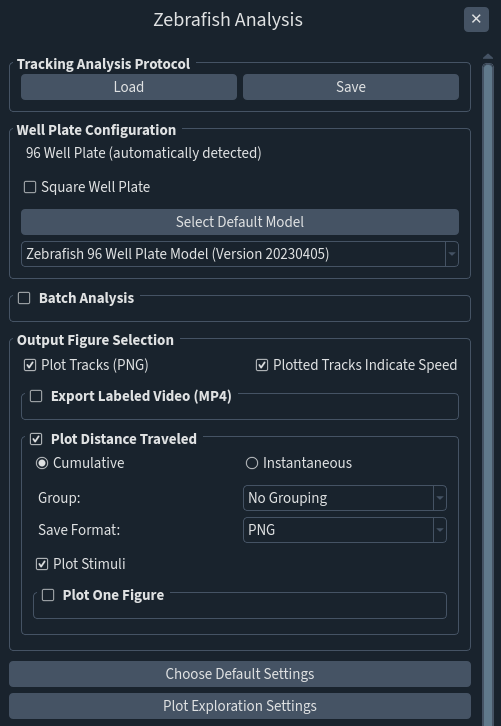
Go to Assays > Animal Tracking to open Zebrafish Analysis panel. Well plate configuration (96-, 24- or custom 12-well) will be automatically detected by MCAM Viewer. |
3 |
If the Compressed Data Folder to be analyzed is a square well plate, check the box labeled Square Well Plate. |
4 |
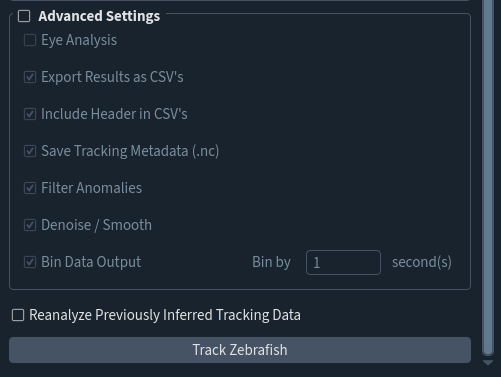
If not all are necessary, check the box labeled Advanced Settings and uncheck boxes beside undesired Zebrafish Tracking Outputs to skip generation. |
5 |
Click Track Zebrafish to generate Zebrafish Tracking Outputs |
Batch File Tracking
Batch file tracking allows the user to generate zebrafish tracking outputs for multiple Compressed Data Folders at once.
All files to undergo batch tracking must share a Well Alignment File.
Step |
Function |
|---|---|
1 |
Go to File > Open File. A popup for folder selection will appear. Click into a Compressed Data Folder of interest, then click Open in the popup to open Compressed Data Folder in MCAM™ Viewer. |
2 |
Go to Assays > Zebrafish Assay to open Zebrafish Analysis panel. Well plate configuration (96-, 24- or custom 12-well) will be automatically detected by MCAM™ Viewer. |
3 |
If the Compressed Data Folder to be analyzed is a square well plate, check the box labeled Square Well Plate. |
4a |
In the Zebrafish Analysispanel, check the box labeled Batch Analysis. |
4b |
Select Add Files to add folders to list to track. Only add files compressed using the same Well Alignment File. |
4c |
If not all are necessary, check the box labeled Advanced Settings and uncheck boxes beside undesired Zebrafish Tracking Outputs to skip generation. |
5 |
Click Track Zebrafish to generate Zebrafish Tracking Outputs |
6 |
The results are stored in a subfolder of the data containing folder. To learn more about the different outputs, please refer to the MCAM User Manual |