

Single Point Segmentation
This analysis allows users to identify and measure the size and morphology of organoids when there is 1 organoid per well. Data outputs include cross-sectional area, circularity, and eccentricity.
Step |
Function |
|---|---|
1 |
Open the MCAM Viewer and click the Open Dataset button. Click into the dataset of interest, then click Open in the popup to open the dataset in MCAM Viewer. |
2 |
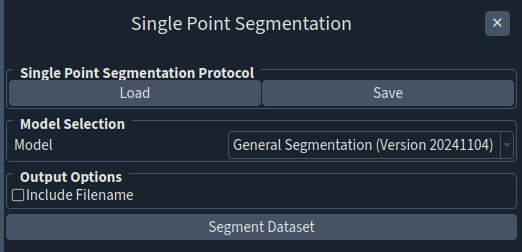
Navigate to Assays > Single Point Segmentation. A panel will open on the right. |
3 |
Click Segment Dataset. |
4 |
The results are saved in a folder named “segmentation_analysis_results” in the parent folder of the analyzed dataset. 3 files are generated: a csv file summarizing the area, circularity, and eccentricity on a per well basis, a analysis_metadata.nc file containing the analysis results, and a png file. |