

Acquire an Image
Capturing an image is the simplest form of data acquisition within the MCAM platform.
Step |
Function |
|---|---|
1 |
Open the MCAM software. |
2 |
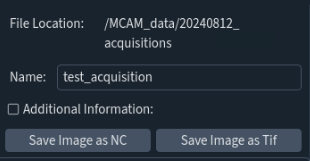
In the left side panel, in the top left corner, click “Select a File Location”. Always select a folder on the “MCAM_data” drive to store data from MCAM acquisitions. The “File Location” will be displayed in the left side panel once defined. |
3 |
Enter a Filename for the image. A timestamp will automatically be appended to the chosen filename. |
4 |
Adjust imaging settings in the left side panel to optimize image quality. |
5 |
Click Save Image as NC or Save Image as Tif to save the image. |