

Stack Projection
Projections are a way to combine many z frames into one. It selects pixels of a desired intensity from every slice throughout the volume to construct a 2D image. The MCAM Stack Projection feature allows the user to select if it is constructed based on the following intensity options: maximum, minimum, mean, sum and standard deviation.
Step |
Function |
|---|---|
1 |
Open the MCAM Viewer and click the Open Dataset button. Click into the stack dataset of interest, then click Open in the popup to open the stackdataset in MCAM Viewer. |
2 |
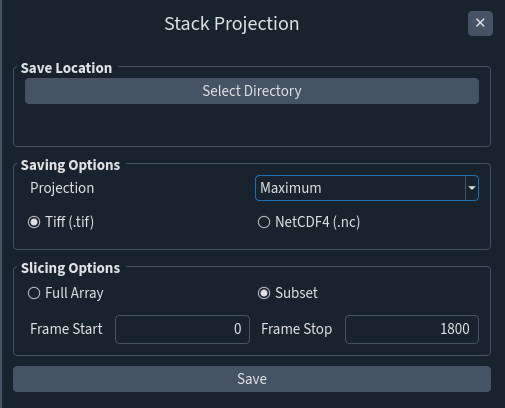
Go to Tools > Stack Projection to open the Stack Projection Panel. |
3 |
Under Location click on Select Directory to choose the file location where the Stack Projection will be saved. As a default it will open up the file location of the stack datasetchosen in step 1. |
4 |
Within Saving Options, select the intended projection method and choose the save format (either TIFF or NetCDF4). |
5 |
Within Slicing Options choose whether the Stack Projection will be taken from all the frames (Full Array) or from a specific subset (Subset). If Subset is selected, define it by typing the Frame Start and Frame Stop accordingly. |
6 |
Click Save to combine the stacks into the desired Stack Projection and save it. |