

Segmentation
The Segmentation tool allows the identification and measurements of various parameters of the objects on interest imaged (organoids and adherent cells; size, surface area, confluence, counts, circularity, eccentricity).
Step |
Function |
|---|---|
1 |
Open the MCAM Viewer and click the Open Dataset button. Click into the dataset of interest, then click Open in the popup to open the dataset in MCAM Viewer. |
2 |
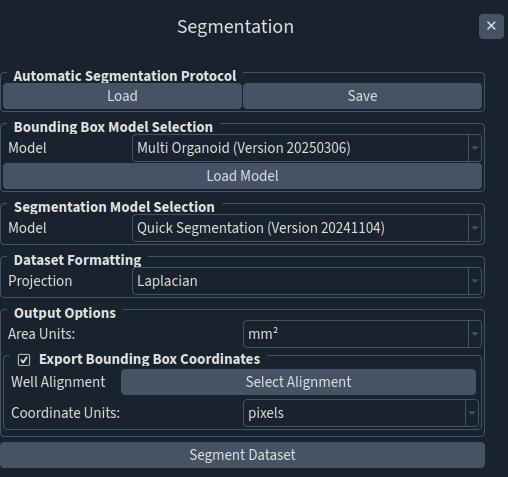
Go to Assays > Segmentation to open the Segmentation Panel. |
3 |
Within Bounding Box Model Selection Options, several options are available. For organoids, choose “Organoid Focus” or “Single Organoid Focus” for samples with single organoids in wells; “Multi Organoids” for samples with multiple organoids in wells. Data outputs are size, total surface area, circularity, eccentricity (Single and Multi Organoid Focus), count, surface areas of individual organoids, and confluence (in Multi Organoids). For 2D adherent cells, choose “Fibroblast Focus”. Data outputs are cell count and confluence. |
4 |
Select “Laplacian” forthe projection. |
5 |
Click Segment Dataset to initiate the analysis and generate Segmented Dataset Outputs. |